Senin, 02 Mei 2011

iPhone | How to Put an iPhone Into DFU Mode  

DFU means Device Firmware Update. If a restore using Recovery Mode doesn't work you will want to use DFU Mode as a last resort. When placing your iPhone into DFU Mode it does not load the OS before attempting the restore

Watch the Video!
For your convenience this tutorial is available in video format also. Click the Watch It button to view the tutorial!


To put the iPhone into DFU mode so you can do an iTunes firmware restore follow these steps:

Step One
Open iTunes and connect the iPhone to your Mac.


Step Two
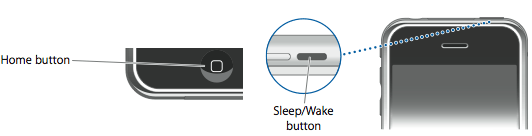
Press and hold the Home button and the Sleep/Wake button at the same time.

Step Three
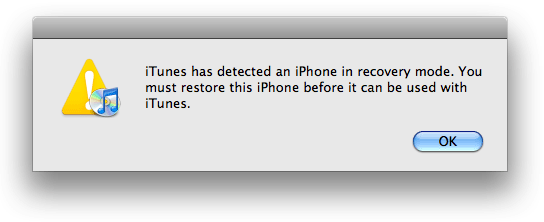
After exactly 10 seconds release the Sleep/Wake button. Continue holding the home button until you iTunes pops up a message telling you that it has detected an iPhone in recovery mode.

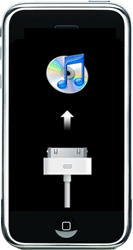
The iPhone screen will remain black like this:


NOTE***: It may take a few attempts to get your iPhone into DFU mode. Generally, I hold down both buttons then release the Home button just before I think the Apple logo would appear. If you are still holding both buttons down and you see the Apple logo you are holding them down for too long!


iPhone | How to Put an iPhone Into Recovery Mode  

To put the iPhone into recovery mode so you can do an iTunes firmware restore follow these steps:

Step One
Open iTunes and connect the iPhone to your Mac.


Step Two
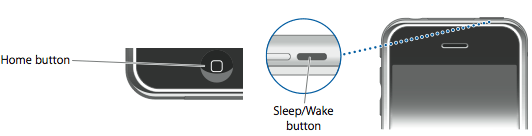
Press and hold the Home button and the Sleep/Wake button at the same time.


Step Three
As soon as the screen goes black release the Sleep/Wake button. Continue holding the home button until you iTunes pops up a message telling you that it has detected an iPhone in recovery mode.


The iPhone will look like this:


Minggu, 01 Mei 2011

myTouch 4G Gingerbread leak brings a new way to tweak your settings

myTouch 4G Gingerbread leak

Well, how about that. Another Gingerbread leak has dropped from our favorite Chinese HTC ROM dumping ground -- this time for the T-Mobile myTouch 4G. It's Android 2.3.3 -- not the just-announced Android 2.3.4 with video chat in Google Talk -- and it's clearly labeled as a test build. But it's also a clear sign that the MT4G is likely to get Gingerbread in the near future.

So what's new? (Or, more important, what's new that's not a behind-the-scenes bugfix?) You've now got a cool "Quick Settings) menu when you pull down the notification bar. Your recently used apps are still there in the notifications, but you can tab over and toggle Wifi, Bluetooth, Wifi hotspot, GPS, mobile data, and hop straight into the settings. It's a cool little addition to an already cool twist on the HTC Sense user interface.

If you're running a stock myTouch 4G, you'll probably want to sit this one out. But we've got video of the leak in action after the break, so you're not totally stuck on the sidelines. Downloads are available at the source links.

Sources: 911HTC; XDA Developers


Yotuube link for mobile viewing


New Otterbox Reflex for iPhone 4

We’ve been testing out Otterbox’s Reflex Series case for the iPhone 4 for the past few weeks and it’s a fantastic offering for anyone who wants great iPhone protection in a slim and light package. The Reflex is a slider case that comes with two parts: put your iPhone 4 in the bottom piece and then slide on the top piece. The case leaves room for all iPhone 4 access points including the volume rocker, silent/ringer switch, earphone jack, dock connector, speaker, and microphone. The case is made of very tough plastic, but is thin and light enough to fit in your pocket, bag, purse, etc…

The good thing about the case featuring two sliding pieces is that the bottom piece can be removed for easy docking in things like speakers or Apple’s iPhone 4 dock. So, why is the case called the Reflex? Well, the video above demonstrates best. When the phone is dropped on a surface/item it has a small bouncing or rebounding effect. This not only ensures that the case will not look damaged, but more importantly will keep your iPhone 4 in pristine condition. Otterbox is known for their larger, Defender series case that certainly is one of the most, if not the most, protective iPhone 4 cases on the market. The Reflex case takes cues from the Defender, but presents them in a thin and light package that anybody would love to keep their iPhone 4 in.

The only major gripe we have with this case – not particularly Otterbox’s fault – is that the new white iPhone 4 does not fit well in it. This is because the white model is slightly thicker. We noticed this while attempting to use the case this week, and Otterbox confirms this on their website. In any case, if you are looking for a solid and protective case for your black iPhone 4, the Reflex is a great offering. The case retails for around $30 on Amazon and comes in black on black, pink on black, green on black, and light blue on black.

IOS 5 on testing?

Over the past few weeks we’ve been getting multiple tips from developers saying that their apps are being tested with iOS 5. The new OS is being tested on all manner of iOS devices including iPods, iPads and iPhones. Unfortunately, we haven’t seen any unreleased devices likely because Apple is aware that usage logs go out to developers and wants to keep those devices under wraps.

This is interesting because widespread testing of apps usually precedes the developer release of a major iOS release by a few months.

Also interesting is that we’ve seen iPhone 3GS’s getting tested (not in the screenshot above, obv). It isn’t immediately clear if the final version of iOS 5 will support iPhone 3GS, but we do know Apple is testing it.

In the past, Apple has seeded new major iOS releases to developers in April, but obviously this year that’s not the case. We’re hearing that iOS 5 will be released in beta form to developers at WWDC in June, perhaps alongside a finished version of Mac OS 10.7, Lion.


Samsung's Galaxy S WiFi 4.0 and 5.0 now rolling out to countries far away from you

While Samsung has yet to announce an actual date for its new Galaxy Players in the US, their international counterparts are already heading towards other parts of the world for a head start. The Galaxy S WiFi 4.0 is said to be debuting in Russia followed by other countries, whereas its 5.0 sibling will be launched in Switzerland. In terms of specs, not much has changed since we last saw these 1GHz, DivX-friendly Android PMPs, and yes, they'll still be shipped with Froyo "with a possibility to upgrade to 2.3 Gingerbread." As always, we'll let you folks know when we eventually find out about the US launch (ifever), though to be frank, we'd rather just go for the beefier Galaxy S II instead.
Show full PR text

Custom IPSW firmware iOS 4.3.2 restore untethered

Download a Custom IPSW firmware iOS 4.3.2 restore untethered Jailbroken and Activated using Sn0wbreeze 2.6for iPhone 4, iPhone 3GS, iPad 1, iPod touch 4G, 3G.


Important Note: If you update to 6.15.00, you may lose your GPS,

iPhone 4
  • Download iPhone 4 iOS 4.3.2 Custom ipsw firmware untethered - Activated ( for users who are not on official carrier SIM card)
  • Dwonload iPhone 4 iOS 4.3.2 Custom ipsw firmware untethered - Unactivated (for users who are on official carrier SIM card)
iPhone 3GS New Bootrom
  • Download iPhone 3GS new bootrom iOS 4.3.2 Custom ipsw firmware untethered - Activated ( for users who are not on official carrier SIM card)
  • Download iPhone 3GS new bootrom iOS 4.3.2 Custom ipsw firmware untethered - unactivated (for users who are on official carrier SIM card)
  • Download iPhone 3GS new bootrom iOS 4.3.2 Custom ipsw firmware untethered Baseband 6.15.00 - Activated ( for users who are not on official carrier SIM card)
  • Download iPhone 3GS new bootrom iOS 4.3.2 Custom ipsw firmware untethered Baseband 6.15.00 - unactivated (for users who are on official carrier SIM card)

iPhone 3GS Old Bootrom
  • Download iPhone 3GS old bootrom iOS 4.3.2 Custom ipsw firmware untethered - Activated ( for users who are not on official carrier SIM card)
  • Download iPhone 3GS old bootom iOS 4.3.2 Custom ipsw firmware untethered - unactivated (for users who are on official carrier SIM card)
  • Download iPhone 3GS old bootrom iOS 4.3.2 Custom ipsw firmware untethered Baseband 6.15.00 - Activated ( for users who are not on official carrier SIM card)
  • Download iPhone 3GS old bootrom iOS 4.3.2 Custom ipsw firmware untethered Baseband 6.15.00 - unactivated (for users who are on official carrier SIM card)

iPad 1 (first generation)
  • Download iPad 1 iOS 4.3.2 Custom ipsw firmware untethered
iPod Touch 4G:
  • Download iPod Touch 4G iOS 4.3.2 Custom ipsw firmware untethered
iPod Touch 3G:
  • Download iPod Touch 3G iOS 4.3.2 Custom ipsw firmware untethered

How to Fix Error 3194:

  • Close TinyUmbrella.
  • Remove Cydia's SHSH caching server from your hosts (C:\WINDOWS\system32\driver\etc\hosts)
  • Reboot.

How To Run iPad Apps On iPhone

I’m not exactly sure why anyone would want to do this, but apparently it’s possible to run iPad apps on your jailbroken iPhone. While it’s not exactly a new idea, a Mac app called iTelePad2Pod makes the process a breeze.

The app is Mac-only, and your phone needs to be jailbroken and have OpenSSH installed. The app simply changes the metadata of iPad apps, adding the iPhone as a compatible device. The app then gets beamed over to your iPhone via SFTP. Not too hard, though it’s not guaranteed to work for all iPad apps.

Further, most iPad apps would look AWFUL on the iPhone, and contain impossibly small buttons, controls, and text… so yeah. You go right ahead and have your fun (instructions are available from ModMyi), but as for me… that’s why I have an iPad.


Gaming: Samsung Galaxy S II vs. LG Optimus 2X

Web browsing: Samsung Galaxy S II vs. LG Optimus 2X